 Calculators & tools
Free Retirement Calculators & Tools: FINRA, SSA & Portfolio Analyzers
The most useful free retirement tools are a how-much-to-retire calculator for your target, a savings-goal calculator for your monthly amount, the SSA’s benefit estimators, and FINRA’s free calculators, including its Retirement Calculator, RMD calculator and Fund Analyzer for comparing fund fees. None of them require an account or payment, and our own calculators run entirely in your browser.
You don't need paid software to plan a retirement. A handful of free retirement calculators and tools — some built here, some from official sources like the SSA and FINRA — cover almost every question you'll have, from "am I saving enough?" to "how do my funds' fees compare?" This guide groups them by the job you're trying to do, so you can jump straight to the right one.
Find out how much you need to retire
Start with the big picture: a target number and whether you're on pace for it. Our free how much do you need to retire calculator estimates your number from your spending, and the retirement savings calculator projects where your current savings and contributions are headed. Everything runs in your browser — nothing you type is sent anywhere.
Set and track a savings goal
If you already know your target, a savings-goal calculator tells you the monthly amount to get there by a chosen date. Use our retirement savings-goal calculator to back into that number, then revisit it once a year as your income changes.
Analyze and stress-test a portfolio
People often search for a "portfolio visualizer" to see how a mix of investments might behave. Our retirement portfolio analyzer lets you weigh an allocation and see how a diversified mix balances growth and risk, and the compound-interest calculator shows how steady contributions grow over decades. For deeper fund-level research, the community-maintained index-fund and ETF resources in our directory are a good next stop.
Estimate your Social Security benefit
Social Security is the backbone of most retirement plans, and the official tools are free and authoritative. The SSA's Quick Calculator and your personal my Social Security statement give a benefit estimate; a claiming-age tool helps you compare filing early vs. waiting. We've gathered the trustworthy ones in Social Security tools, and our guide to how Social Security retirement works explains the numbers behind them.
FINRA calculators and the Fund Analyzer
FINRA (the Financial Industry Regulatory Authority) is the regulator that oversees U.S. brokerage firms, and it publishes a set of free investor calculators. The ones most useful for retirement planning, listed on its tools and calculators page:
- Fund Analyzer: compares the fees and expenses of mutual funds, exchange-traded funds, exchange-traded notes and money market funds, and shows how those costs add up over time. This is the tool most people mean when they search for “FINRA calculator” or “fund analyzer.” Our directory lists it as the FINRA Fund Analyzer.
- Retirement Calculator: checks whether your savings are on track to last through retirement.
- 401(k) and IRA Required Minimum Distribution Calculator: estimates your RMD from a traditional 401(k) or IRA. To understand the IRS tables behind it, see our guide to IRS Publication 590-B.
- 401(k) “Save the Max” Calculator: shows whether your per-paycheck contribution will reach the IRS limit for the year. The current limits are in our 2026 and 2027 contribution limits guide.
- Savings Calculator: shows how a consistent approach to investing can grow your money.
- BrokerCheck: not a calculator, but FINRA’s free tool to confirm whether a broker or firm is registered, and the first thing to check before you hire anyone.
All of them are gathered under FINRA tools and calculators in our directory, alongside other vetted retirement calculators & tools.
Other free retirement planning tools worth knowing
- Bankrate retirement calculators: a collection of free calculators from a consumer finance publisher, useful for a quick second opinion on your projections.
- Portfolio Visualizer: an online tool for back-testing an asset mix against historical returns. Past returns don’t predict future ones, so treat results as a stress test, not a forecast.
- cFIREsim: a retirement-withdrawal simulator popular with early retirees, for testing how long a portfolio might last under different spending plans.
- SSA Quick Calculator: a rough Social Security estimate from your age and earnings, before you sign in for your full record.
Whatever tool you use, the answer is only as good as the inputs. Use your real spending, not a rule of thumb, and rerun the numbers once a year. Our guide to how much you need to retire explains which inputs matter most.
Which tool should I start with?
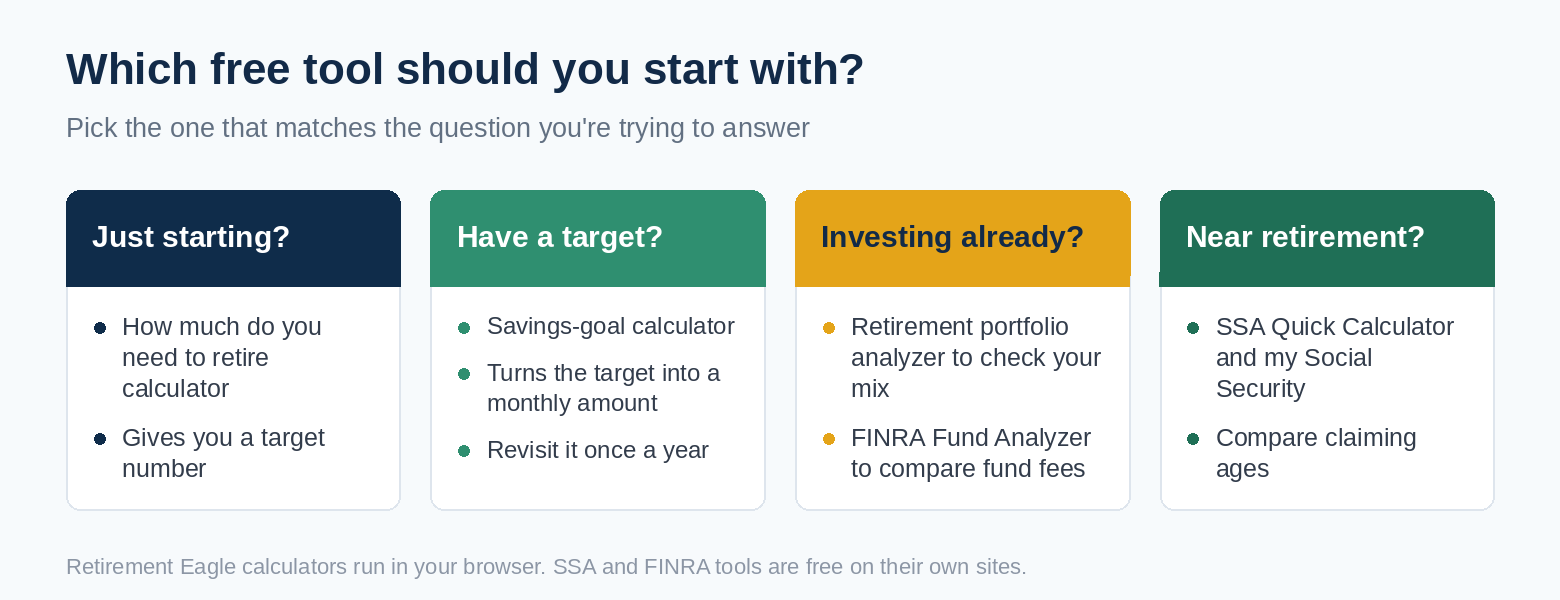
- Just starting? Run the how much to retire calculator to get a target.
- Have a target? Use the savings-goal calculator to set a monthly amount.
- Investing already? Check your mix with the portfolio analyzer and your fund fees with FINRA's Fund Analyzer.
- Turning 73 soon? Use FINRA’s RMD calculator and read our RMD guide.
- Near retirement? Estimate benefits with the SSA tools and plan your claiming age.
Common questions
What is the best free retirement calculator?
There isn't one single best calculator — use the one that matches your question. For a target number use a how-much-to-retire calculator, for a monthly plan use a savings-goal calculator, and for benefit estimates use the SSA's official tools. All of Retirement Eagle's calculators are free and run entirely in your browser.
Is there a free portfolio visualizer?
Yes. Retirement Eagle's retirement portfolio analyzer is a free, browser-based tool for weighing an allocation and seeing how growth and risk balance. For fund-level research, FINRA's free Fund Analyzer compares long-run fund costs.
Does the SSA have a retirement calculator?
Yes. The Social Security Administration offers a free Quick Calculator and personalized estimates through your my Social Security account, plus tools to compare claiming ages.
What FINRA tools help with retirement?
FINRA's free Fund Analyzer projects the long-run cost of mutual funds and ETFs so you can compare fees before investing. It's one of the most useful free tools for choosing low-cost retirement funds.
What is the FINRA Fund Analyzer?
A free FINRA tool that compares the fees and expenses of mutual funds, ETFs, exchange-traded notes and money market funds and shows how costs add up over time.
Does FINRA have a retirement calculator?
Yes. FINRA offers a free Retirement Calculator, a 401(k) and IRA Required Minimum Distribution Calculator, a 401(k) Save the Max Calculator and a Savings Calculator on its tools and calculators page.
Is there a free retirement planning tool that does not need an account?
Yes. Retirement Eagle's calculators, FINRA's calculators and the SSA Quick Calculator are free and need no account. Retirement Eagle's calculators run entirely in your browser.
Sources
- SSA — Retirement Estimator & calculators
- FINRA — Fund Analyzer
- FINRA — Tools & calculators (Retirement, RMD, Save the Max and Savings calculators; BrokerCheck)
- SEC Investor.gov — Financial tools & calculators
Try it: Retirement Savings Projection
See what your savings could grow to by the age you want to retire. Everything runs in your browser, and nothing you type is sent anywhere.
Estimates only, based on the numbers you enter. Open the full Retirement Savings Projection or see all calculators.

Comments
No comments yet — be the first to share your thoughts.
Sign in or create an account to comment.